Overview
https://github.com/kutaydemir07/PyLCSS PyLCSS (Python Low-Code System Solutions) is a professional engineering design platform. It allows engineers to model complex multidisciplinary systems through a node-based visual interface, run parametric CAD and FEA simulations, explore high-dimensional Solution Spaces, and optimise designs using 7 different algorithms — all within a single desktop application.
Built for real-world engineering workflows, PyLCSS features a crash-free multi-threaded architecture, vectorised computation kernels, comprehensive file I/O, and an integrated AI coding assistant.
pylcss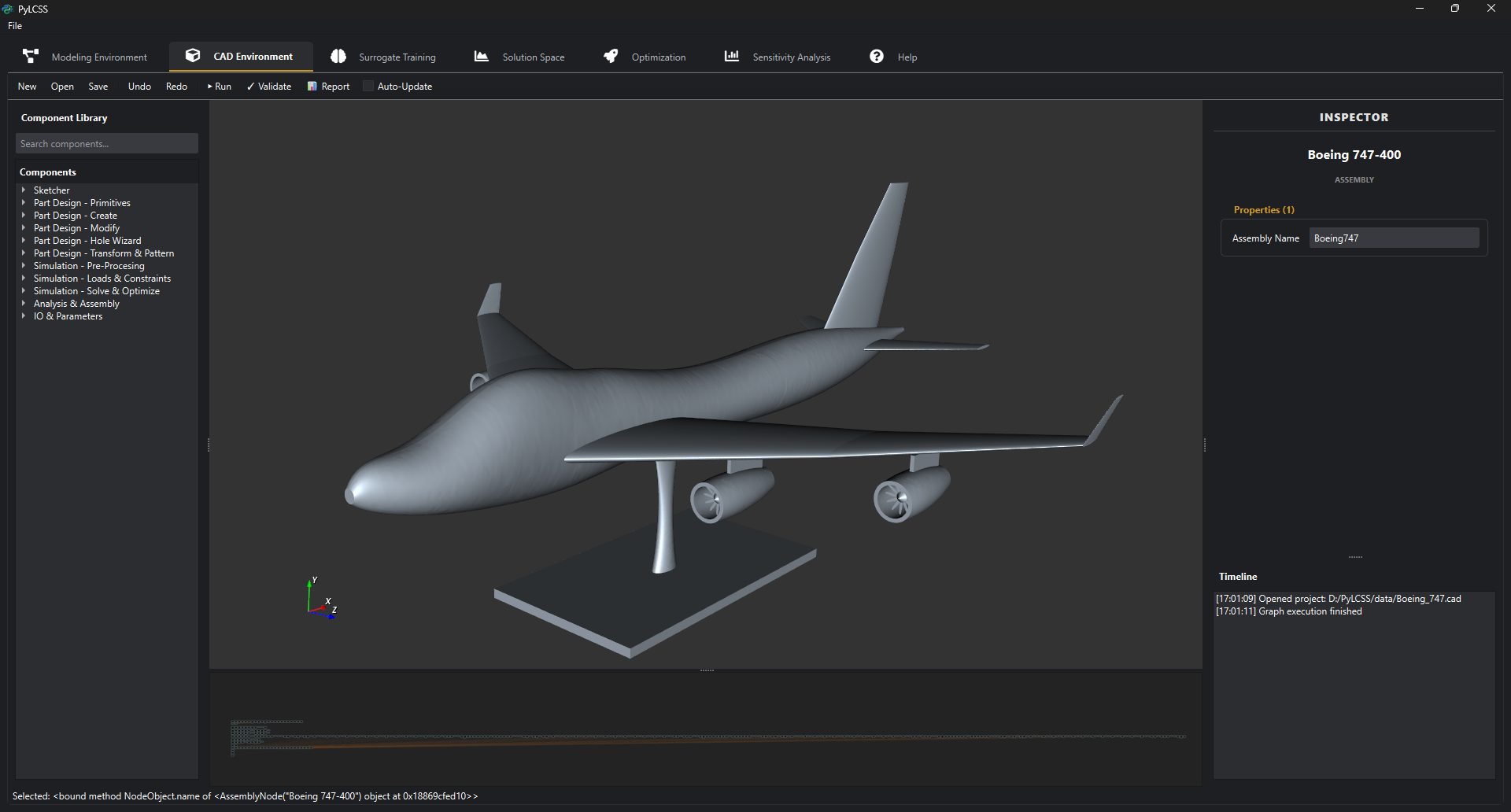
Scientific Foundation
PyLCSS implements the Solution Space approach for robust design: instead of seeking a single optimal point (which may be sensitive to tolerances), it identifies box-shaped regions of valid designs, enabling decoupled subsystem development.
Markus Zimmermann, Johannes Edler von Hoessle, “Computing solution spaces for robust design”, Int. J. Numer. Meth. Engng., 2013. DOI: 10.1002/nme.4450
Key Features
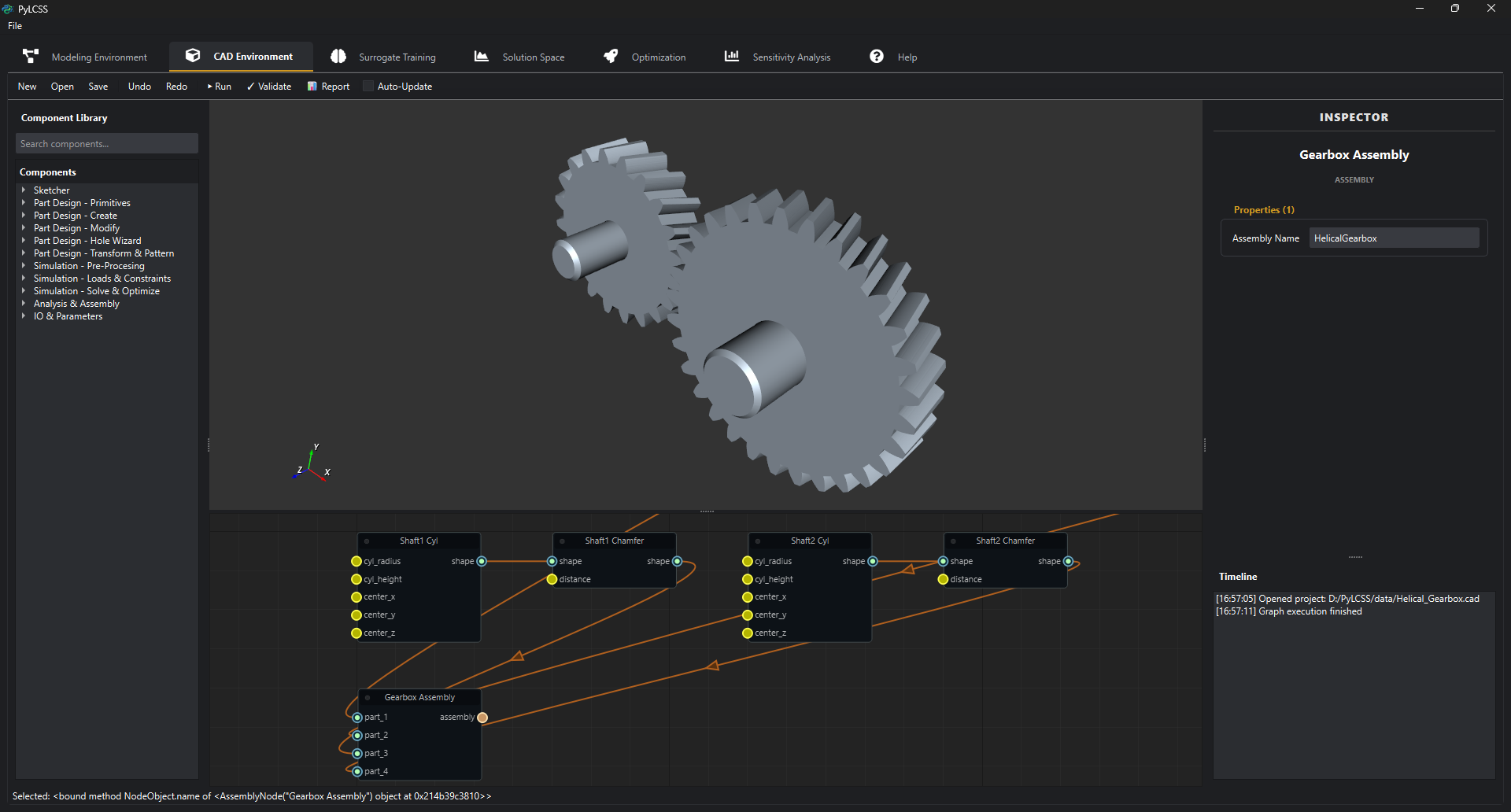
Parametric CAD Environment
- 70+ Node Types — Primitives, Booleans, Fillets, Chamfers, Sweeps, Lofts, Shells, Patterns, Imports
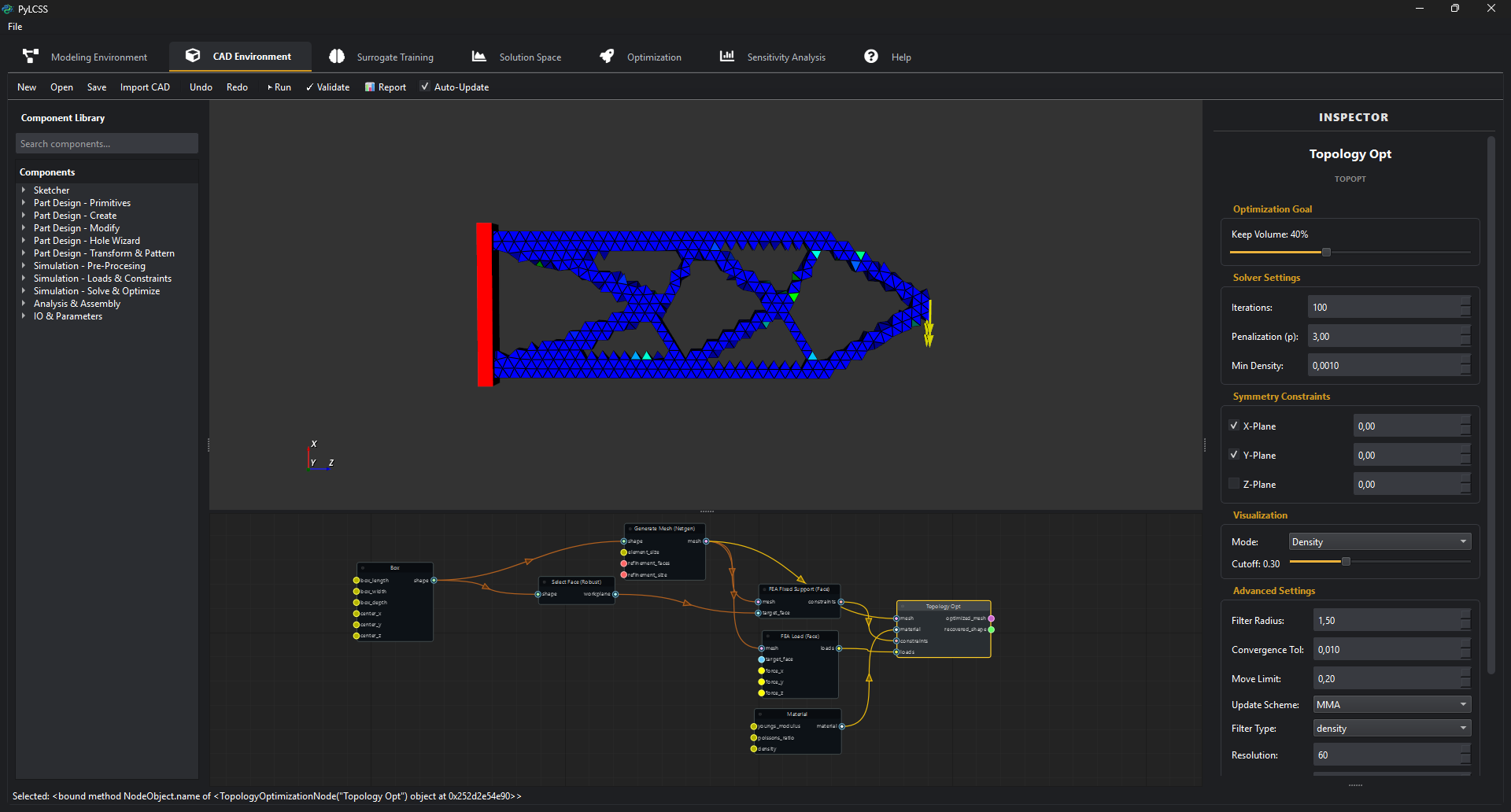
- Topology Optimisation — SIMP with MMA/OC solvers, density/sensitivity filtering, Heaviside projection, symmetry constraints, shape recovery with marching cubes, and direct STL/OBJ export of optimised shapes
- Advanced Nodes — Thicken, Pipe, Split, Text emboss, Math Expression evaluator, Import STEP/STL
- Real-Time 3D Viewer — VTK-based with density cutoff preview during optimisation
- Measurement — Distance, surface area, and volume nodes
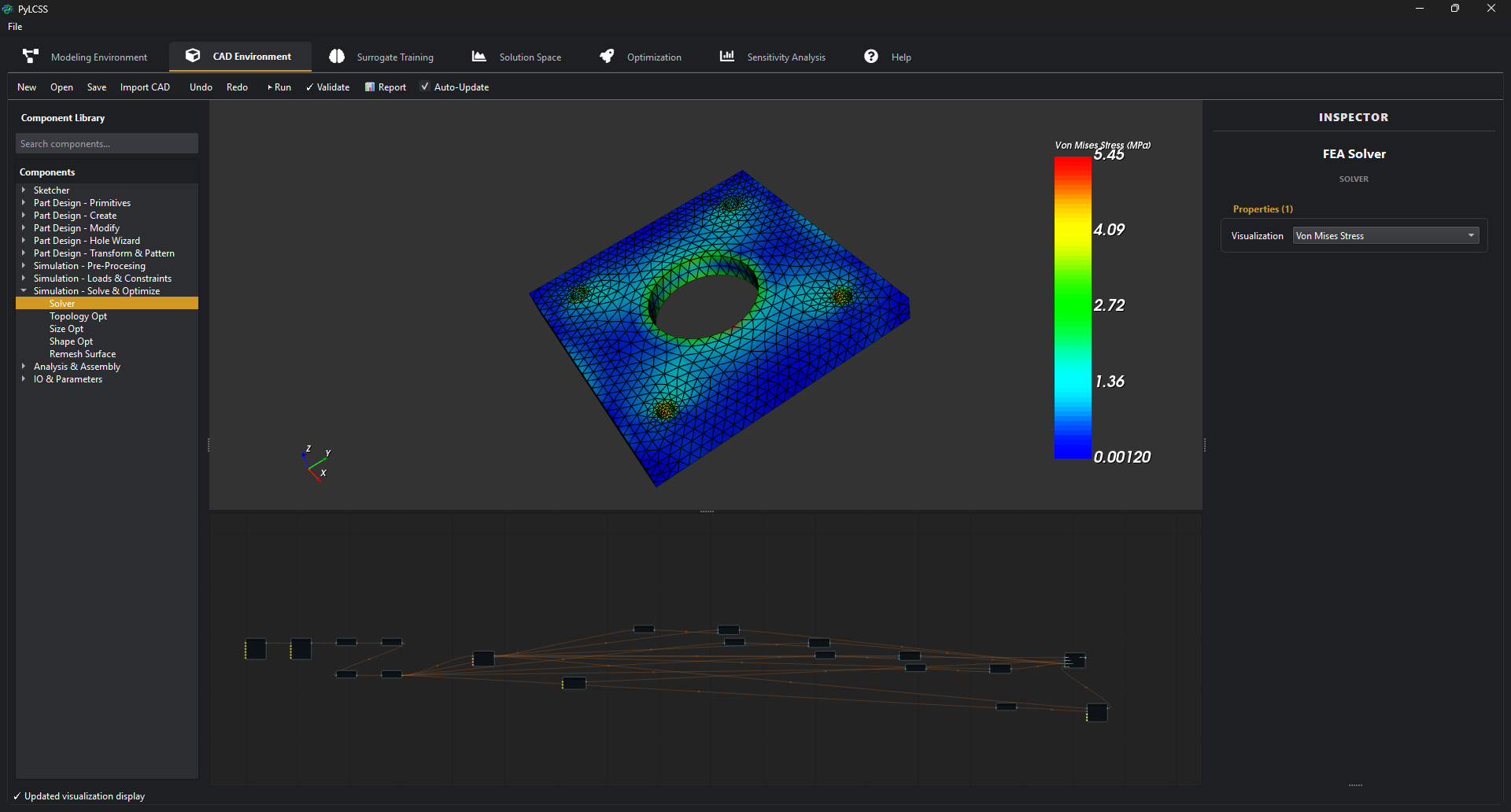
Finite Element Analysis (FEA)
- scikit-fem + Netgen meshing — Tetrahedral/triangular elements
- Linear Elasticity — Displacement, von Mises stress, compliance
- FEA Results Nodes — Stress extraction, displacement, reaction forces
- Remeshing — Surface-to-solid conversion for topology-optimised shapes (up to 20 000 faces)
Multi-Objective Optimisation (7 Solvers)
| Algorithm | Type | Best For |
|---|---|---|
| SLSQP | Gradient-based | Fast local optimisation with constraints |
| COBYLA | Derivative-free | Noisy or non-differentiable models |
| trust-constr | Interior point | Large-scale constrained problems |
| Differential Evolution | Population-based | Global search, black-box functions |
| Nevergrad | Meta-optimiser | Algorithm-agnostic global search |
| NSGA-II | Multi-objective evolutionary | Pareto fronts with 2–5 objectives |
| Multi-Start | Hybrid global+local | Avoiding local minima via LHS starts |
Global Sensitivity Analysis (4 Methods)
| Method | Indices | Use Case |
|---|---|---|
| Sobol | S1, ST, S2 interaction | Variance decomposition |
| Morris | μ, μ*, σ | Screening with few evaluations |
| FAST | S1, ST | Fourier decomposition, fast convergence |
| Delta (DMIM) | δ, S1 | Moment-independent, distribution-based |
- Batch analysis across all outputs, convergence study, importance ranking (Critical / Important / Minor / Negligible)
Surrogate Modelling & Validation
- 5 Algorithms — MLP Neural Network (PyTorch), Random Forest, Gradient Boosting, Gaussian Process, SVR
- Cross-Validation — K-Fold (2–20 folds) and Leave-One-Out
- Model Comparison — Automated comparison of all 5 algorithms on same dataset
- Feature Importance — Permutation-based and tree-based importance analysis
- Hyperparameter Optimisation — Grid search and random search with built-in search spaces
Solution Space Exploration
- Monte Carlo Sampling — Vectorised evaluation of thousands of design variants
- Visualisation — 2D scatter, parallel coordinates, feasibility maps
- Product Family Analysis — Common platform identification across product variants
- Step Analysis — Iterative box-size refinement
Export Capabilities
| Category | Formats |
|---|---|
| CAD Export | STEP, STL, OBJ |
| Data Export | CSV, Images (PNG, SVG, PDF) |
| Project | Project Folder (JSON-based .cad files + data) |
Engineering Utilities
- Expression-Aware Inputs — Safe AST-based evaluation (sin, cos, sqrt, log, variables) in input fields
- Unit-Aware Inputs — Physical unit support via pint (SI, Imperial, CGS) in simulation nodes
LLM-Powered Voice Assistant
- Natural Language Control — “Zoom in”, “Create a helical gear”, “Go to properties”
- Local STT — Faster-Whisper for real-time speech recognition
- Multi-Provider LLM — OpenAI, Claude, Gemini, LM-Studio
- Privacy-First — Optional fully local execution
Installation
Prerequisites
- Python 3.8+
- OS Windows 10/11 (macOS and Linux: experimental)
Quick Install
# Clone
git clone <repository-url>
cd pylcss

# Virtual environment
python -m venv .venv
# Windows:
.venv\Scripts\activate
# Linux/Mac:
source .venv/bin/activate

# Dependencies
pip install -r requirements.txt

# Launch
python scripts/main.py
Or on Windows: double-click run_gui.bat.
Quick Start
- Launch —
python scripts/main.py - Load a Model —
File → Open→ selectdata/Gear Unit.json - Validate — Click “Validate” to check units and connections
- Solution Space — Switch to Solution Space tab → “Compute”
- Visualise — Plot Weight vs. Safety Factor
- Optimise — Go to Optimisation tab → select objectives → Run
Architecture
pylcss/
├── cad/                  # Parametric CAD kernel (CadQuery + OCC)
│   ├── nodes/            # 50+ node types (primitives, booleans, FEA, TopOpt)
│   ├── engine.py         # Graph execution engine
│   └── node_library.py   # Node registry
├── optimization/         # 7 solvers (SciPy, Nevergrad, NSGA-II, Multi-Start)
├── sensitivity/          # 4 methods (Sobol, Morris, FAST, Delta)
├── solution_space/       # Monte Carlo, step analysis, product families
├── surrogate_modeling/   # 5 ML algorithms + CV + HPO + feature importance
├── io_manager/           # CAD/mesh/data/project I/O (15+ formats)
├── system_modeling/      # Graph-based system model builder
├── assistant_systems/    # LLM voice assistant & tools
└── user_interface/       # PySide6 + VTK desktop application
Tech Stack
| Layer | Technologies |
|---|---|
| UI | PySide6, NodeGraphQt, QtAwesome |
| CAD | CadQuery, OpenCASCADE (OCP), VTK |
| FEA | scikit-fem, Netgen, meshio |
| Computation | NumPy, SciPy, Pandas |
| Visualisation | VTK (3D), pyqtgraph (2D) |
| ML | PyTorch, scikit-learn |
| Optimisation | SciPy, Nevergrad, SALib |
| Units | pint |
| Serialisation | h5py, dill, joblib |
| AI Assistant | Faster-Whisper, OpenAI, Edge-TTS |
License
Licensed under the PolyForm Shield License 1.0.0.
Allowed: Personal use, academic research, internal business use. Restricted: You cannot use this software to build a competing product or service.
See LICENSE for full details.
Copyright © 2026 Kutay Demir. All rights reserved.